
B2B PROSPECTING PLATFORM
Find the right B2B people faster
Find relevant professionals, enrich people and company records, and discover available professional emails in one prospecting workflow. Leadvaro connects People Search, Data Enrichment, and Email Finder to help you build focused B2B prospect lists.
✓ People discovery ✓ Data enrichment ✓Email Finder
Built for practical prospecting
Know why each prospect belongs on your list
A useful shortlist needs more than names. Before adding someone, review their role, company fit, and available contact details. Leadvaro helps you keep that context in view as you select prospects.
When research is scattered
×Roles and company details are checked in separate places.
×Existing records lack useful context.
×Contact lookups lose sight of the person behind them.
×Selected prospects end up across notes and files.
With Leadvaro
✓Review the person and company together.
✓Add available context where a record needs it.
✓Check contact results for the prospect you selected.
✓Save your shortlist and export it when ready.
People Search
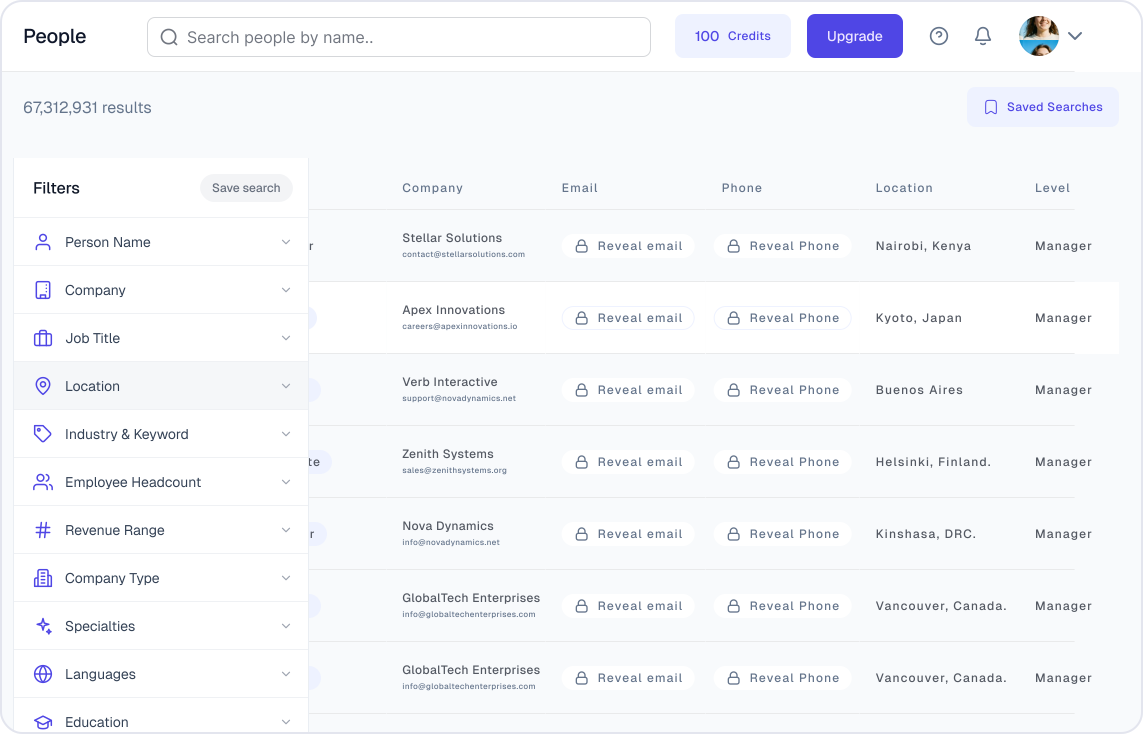
Find relevant professionals with People Search
Start with the role you need, then narrow your search using seniority, location, industry, and company criteria. Review matching profiles before deciding which people to save for further research.
✓
Set the target role
Use job title, company, location, industry, employee headcount, revenue and other available criteria.
✓
Refine company fit
Add industry, headcount, revenue range, or location criteria where useful.
✓
Review the matches
Check profiles before adding selected people to a list or exporting.
Data Enrichment
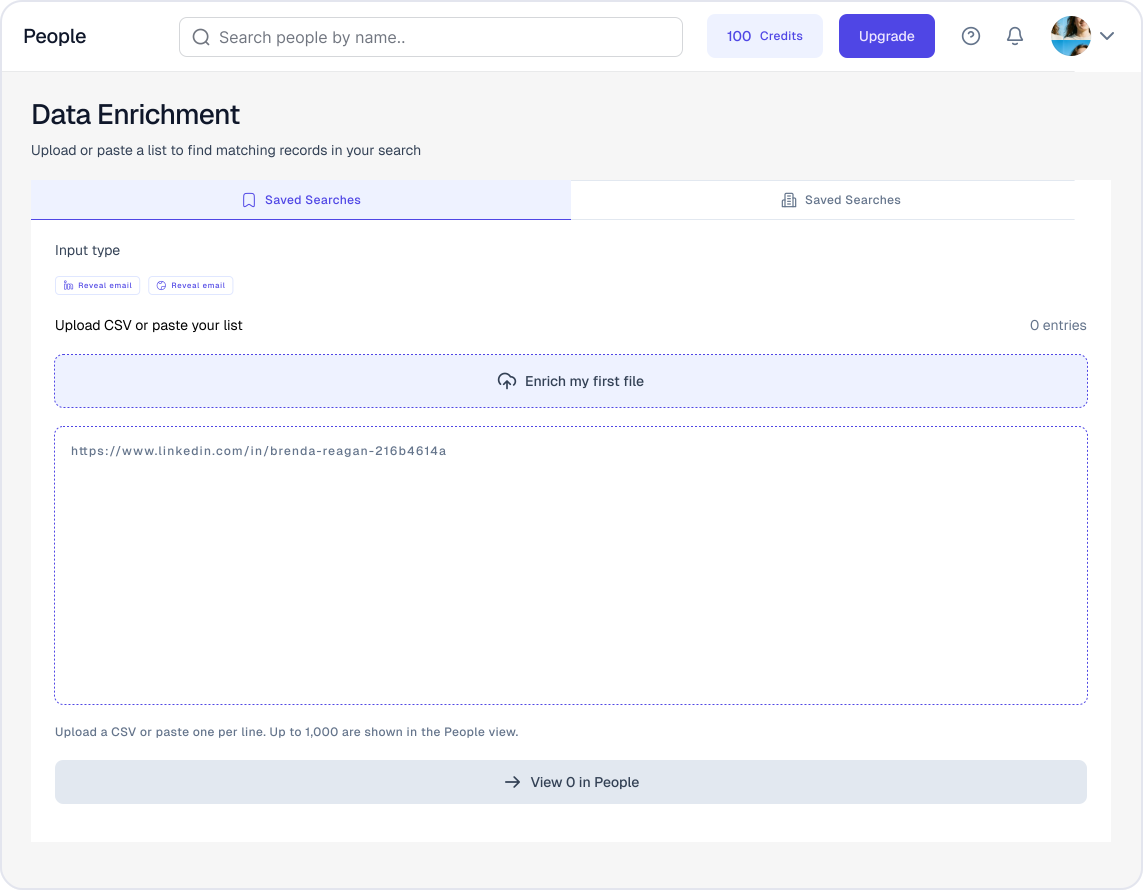
Add context to existing people and company records
Bring supported URLs, CSV files, or pasted records into the appropriate People or Company Enrichment workflow. Review the returned fields before using the results to assess or organize prospects.
✓
Choose the record type
Use People Enrichment for professional context or Company Enrichment for business context.
✓
Start with supported inputs
Use a URL, CSV upload, or pasted records according to the selected workflow.
✓
Inspect the output
Check which fields are available for each record before using the enriched data.
Email Finder
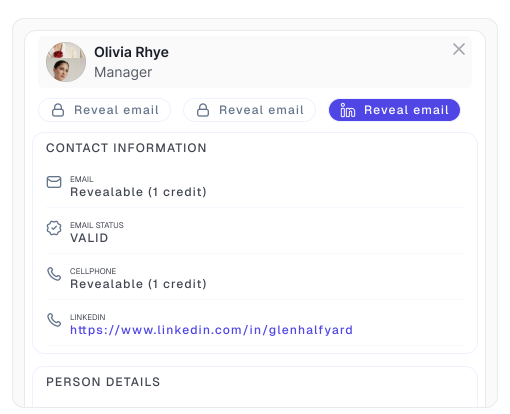
Find professional emails for people you want to reach
Once you have identified a prospect, use their available person and company context to look for a professional email. Review the returned result before using it for outreach.
✓
Start from a selected prospect
Work from a person you identified through search or an existing record.
✓
Review the email result
Check any available email information and displayed status against the person and company.
✓
Account for unavailable results
A lookup may return no email, so do not assume every selected prospect has contact data.
Built for B2B workflows
Explore B2B prospecting use cases by team
Teams begin with different tasks: preparing a client audience, finding buyers, planning a campaign, researching candidates, or improving existing records.
For Agencies
Define a target audience for each client and organize selected professionals into lists for review and export.
For Sales Teams
Identify relevant roles at target companies and review available contact details before outreach.
For Marketing Teams
Build audiences around role, industry, company size, and market criteria for campaign planning.
For Founders
Explore which roles and companies fit an early ICP before building a larger prospect list.
For Recruiters
Search by role, skills, company, and location, then save a shortlist for a specific opening.
For RevOps Teams
Enrich existing people and company records and review available fields before using the data in other workflows.
Data & trust
Review Leadvaro’s data and security resources
Data availability can vary by record and market. Review Leadvaro’s public resources to understand the data categories it describes and the security information it has published.
Check the details before you start
Our Data explains data categories and coverage. Security describes published practices and how to ask specific security questions.
Customer reviews
What teams say about prospecting with Leadvaro
How sales, marketing and agency teams use Leadvaro to find the right people and build better prospect lists.
Excellent service, with detailed quotes for different options and top quality business data delivered on time.

Working with Leadvaro to obtain large volumes of data is effortless and efficient. I strongly recommend them.

I recently used Leadvaro, and it was a wonderful experience. The prospect list was high-quality and reasonably priced.

It's extremely difficult to find affordable and high-quality prospect lists. Leadvaro one of the best out there. We have got next level of accuracy.

Good leads, highly reliable, fast and no errors. Even in the highly difficult German market.

Great service! We have used Leadvaro as our main data sourcing platform and we got exactly what we needed. Definitely recommend!

FAQ
Frequently asked questions about Leadvaro
Choose the right tool, understand what data may be available, and see how to organize selected prospects.
Leadvaro is a B2B prospecting platform that brings People Search, Data Enrichment, and Email Finder into one workflow for researching professionals, improving records, and preparing prospect lists.
People Search supports practical filters such as person, company, job title, contact method, location, industry, employee headcount, revenue range, company type, languages, education, skills, technologies, web traffic, funding, years in current company, and company founded year, subject to current product availability.
Yes. Leadvaro provides People Enrichment and Company Enrichment workflows that can work with supported LinkedIn URLs or websites, CSV uploads, or pasted records.
No. Email Finder is one part of the broader Leadvaro workflow. The platform also supports people discovery, contact discovery, data enrichment, list building, and export.
Leadvaro is designed around B2B workflows used by lead-generation agencies, sales teams, SaaS founders and teams, recruiters, and other prospecting-focused professionals.
Start with the free plan and available credits, or book a demo if you want to discuss a specific prospecting workflow with the Leadvaro team.
Build better B2B prospect lists with Leadvaro
Find relevant professionals, add available context to existing records, and look for contact details as you prepare outreach.